• 50% OFF WEEKEND SALE • FREE PRODUCTS • EGGY ALL ACCESS
    Grab something for half price this weekend
    Use code HALFPRICE to save 50% on all products during our weekend sale. You can also explore our free releases or join Eggy All Access from $14.99 a month, with annual billing available. Both subscription options include full access to all included current and future games, styles and products while your membership remains active.
  • Welcome to the Eggy Forums
    News, support, bug reports, feedback and community discussion for everything Eggy.
    Eggy News & Announcements Official releases, product updates, promotions, competitions and important Eggy news.
    General Discussion General community discussion, casual conversation and everyday topics across Eggy.
    Add-on Support Installation, configuration, upgrade and general support for Eggy products.
    Bug Reports Report reproducible bugs, errors and unexpected behaviour that needs investigating.
    Need support? Please include the product name and version, your XenForo version, what happened, and any relevant screenshots or server error logs. Providing clear details helps us investigate issues much faster.

Resolved Messenger Install Fail / DB Issue

  • The name of the Eggy add-on - Messenger
  • The version you are using - 1.1.1b
  • Your XenForo version - v2.3.13
  • A clear description of the problem - won't install add-on after the contents of the upload folder have been uploaded to their respective sub-folders - and posts a SQL exception shown below.
  • Any relevant error messages or screenshots:
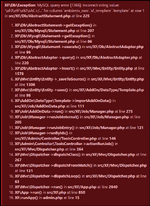
    1789480383902.png
  • What you were doing when the problem occurred - was uploading the contents of the messenger folder as there were no usual text files present like INSTALL.txt or README.txt - so I just did the commonsense thing - or so I thought. Ooops?
 
Thanks for reporting this. I’ve tracked down the cause and prepared an updated build that should resolve the install issue on your database setup. I’ve sent you a DM with the updated version and the details 🙂
 
Thanks for reporting this. I’ve tracked down the cause and prepared an updated build that should resolve the install issue on your database setup. I’ve sent you a DM with the updated version and the details 🙂
Thank you very much - everything is working as intended!
 
Thank you very much - everything is working as intended!
A mandatory upgrade is required to 1.1.1d the relevant changelog/description can be found on product page but I'd advise upgrading due to a report from another customer. A few other fixes were also applied with in the same area.

And you're welcome anytime :-D

 
A mandatory upgrade is required to 1.1.1d the relevant changelog/description can be found on product page but I'd advise upgrading due to a report from another customer. A few other fixes were also applied with in the same area.

And you're welcome anytime :-D

Already updated, thank you!
 
Back
Top